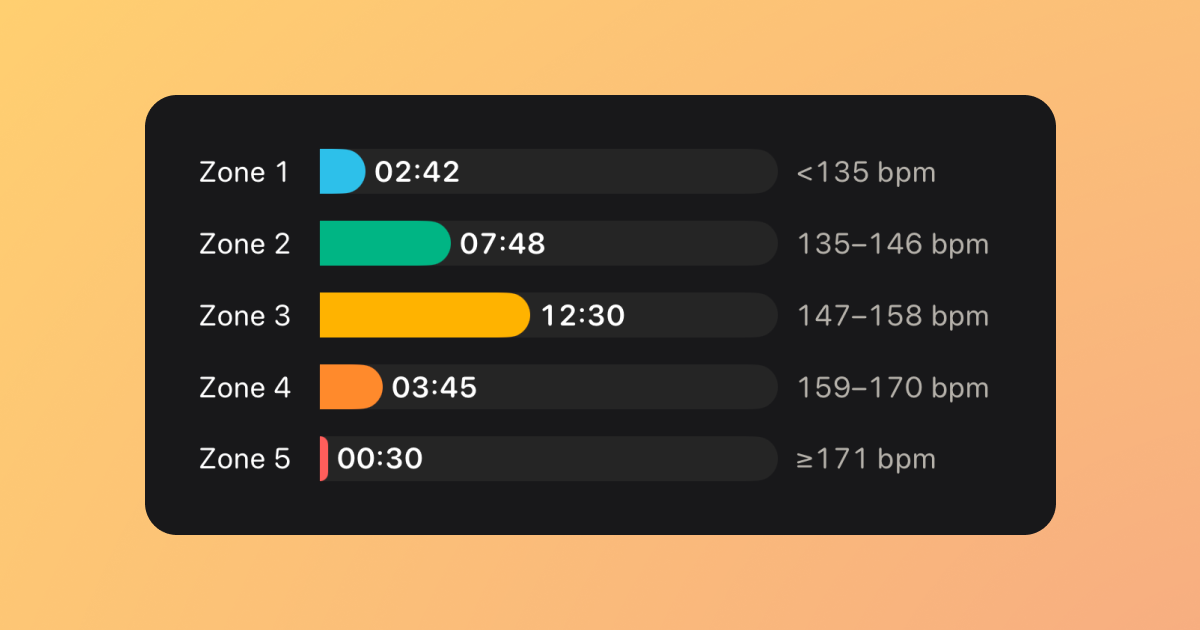
With Watch to 5K Version 8.1, you can now see how your effort was spread across five heart rate zones after a completed run.
A clearer way to understand how a run felt, not just how fast you went.
HEART RATE ZONES AT A GLANCE
Open a completed run in the iPhone companion app and swipe through the detailed metrics to find the new Heart Rate Zones view.
It shows the time you spent in each zone, your heart-rate range for that zone and a simple visual breakdown of your effort.
Zone 1 through to Zone 5. All in one clear view.
POWERED BY APPLE HEALTH
This feature uses the new workout-zone support Apple added to HealthKit in iOS 27 and watchOS 27.
Watch to 5K reads the zones and time-in-zone data saved with your completed workout. This means the values match the zones you use with Apple Health, whether they were generated automatically or adjusted manually in Health Settings.
No extra setup. No separate score to learn.
EFFORT HAS CONTEXT
Two runs at the same pace can feel completely different. Heart Rate Zones add more context by showing how hard your body was working throughout the run.
As you progress through the plan, the new view can help you understand the effort behind each session without giving you another target to chase.
CLEAR AND ACCESSIBLE
The coloured bars make your time in each zone easy to compare at a glance.
VoiceOver also describes each zone’s duration, heart-rate range and share of tracked time, so the breakdown does not rely on colour alone.
HOW TO GET IT
Update to Watch to 5K Version 8.1 from the App Store. Complete a run using watchOS 27, then open the run in the iPhone companion app on iOS 27 to see your Heart Rate Zones.
Runs recorded before watchOS 27 will continue to show the existing heart-rate chart.
Download Watch to 5K on the App Store
Happy running!

